Categories
Uncategorized

It was colder than…

Today in the Seattle Times’ Here & Now Traffic Watch:


Several thousand people are expected at Safeco Field today for a private, daylong business gathering. Pedestrian and vehicle traffic, including more than 200 charter buses, is likely to impact the stadium area from about 8:30 a.m. to 5:30 p.m.


No kidding.


The lights. The sounds. The demos (many were high-level highlights from PDC). The chocolate bars. OK, scratch the last one. Robch has a good summary on his blog tonite, ‘though he did miss the remaining two items from his top five list (not to mention XBOX 360, TabletPC, Windows Starter Edition, the new suite of Windows Mobile 5.0 devices and of course Windows Media Center Edition… so it should probably be a top ten list).


So I’ll add these two for now to round out the top five as it’s bedtime for the kids (aka “the witching hour”):


4. The presenters: I was impressed by just about everyone, and how they noted the importance of our customers in almost every one of the sessions. When you look at the suite of products and services discussed this summer and our incredibly customer-tech-product focused execs, I’m happy to be here.


5. The crowd: Microsofties at their best, with super enthusiasm even in sub-arctic weather (think March of the Penguins). Kudos to those with the gumption to import noise makers and rock the house.


Word of the week: “Zany”  Considering the source I’ll use that in my general responses from now on.


Phrase for the rest of the year: “Heavens to Betsy.” Continuous Improvement is already in my vocabulary.


(Added 092405: If you’re interested in reading — and listening to — a joint interview with Bill and Steve just after the meeting, check out the article in today’s Seattle Times.)
Categories
Uncategorized

Windows OneCare (Status: Beta)

Enterprise Windows IT has a brief story this week on Windows OneCare which is in beta. Says E-W-IT:


“If Windows OneCare is reasonably priced, plenty of consumers will be happy to forget all about viruses, firewalls, and file fragments and let the computer take care of itself.”


Just having a service ping me regularly to defrag and back up is helpful. And better for members of the family who may not think about that along the same lines as other things that fit into the rhythm of everyday technological lives.


Now, getting such a thing to work automatically with my LAN storage… that would be nice. I’ve had a number of customers and friends with small home networks say that the next barrier for them is to move away from writable disc back-up to doing more with their home network: PC back-up, storage and file serving (OK, they don’t call it “file serving” but “I want to access my ripped WMA collection in the office on my family room PC.”). In talking with customers at the local computer superstores (especially the ones that flag you down as you have some MS logoware on or similarly monikered paraphanalia dangling off of a belt) I’ve found that interest in personal back-up has reached an all-time high, almost in line with security and keeping their PCs up-to-date.


Perhaps it’s just the disaster scenarios everyone sees on the nightly news. That’s the one that triggered a recent discussion in a coffee line on “but what do I do to ensure that the stuff on my computer is still safe when my house falls into a giant sink hole?” Remote file storage is a great idea, but who has time to send discs to the bank vault? I’ve done that onle a couple of times, and that after hearing of a friend losing everything in a house fire.


Neat solutions are starting to emerge along the lines of ibackup’s offering, which does part of what I’d like, but better synchronization and integration with the PCs on my home network would be a real treat. Just increase the size to match the size of My Documents (anyone have less than 5GB these days? Surely, you jest…) and add a nice, secure web-enabled front end so I can access my files anywhere. It might even make migrating to a new PC that much easier.

Categories
Uncategorized

Malware is deadware with MWMSRT…

My kids clicked on some crazy web page yesterday and installed a piece of software that just wouldn’t uninstall. (Note: I remembered today that I could’ve booted in safe mode and then unistalled the #$%&ware, but with two screaming boys scrambling for the PC you don’t always think clearly…)


Call out the dogs: the Microsoft Windows Malicious Software Removal Tool on the MS website checks computers running Windows XP (as well as Windows 2000 and Windows Server 2003) for infections. I ran it last night and poof, no more malware.


Very cool.


(While you’re at it check out the AntiSpyware beta which I found worked well and was easy to set up.)


What I found interesting while looking though the parent’s guide on Microsoft.com (which I like) was what they said about…


What 5-6 year olds can do online
Kids at this age may be very capable at following commands on the computer, using the mouse, and playing computer games. They are, however, highly dependent on adults or older siblings to help them find Web sites, interpret online information, or send e-mail.

Huh? My 4-yr-old easily heads off to PBS Kids, Nick Jr and other sites without so much as a holler. Once he starts to type the first couple of letters, IE autofill takes over…

Categories
Uncategorized

“Grumble grumble.” Customers talk back to Comms Companies…


The Washngton Post today has an interesting online transcript of a discussion between consumers and company execs to discuss customer service in the communications industry. Included were execs from Cingular Wireless, Cox Communications and Verizon. This was a follow up to an article that ran in August in the Post…


Consumers Frustrated With Static on the Service Line

Communications Companies Rankle Customers

Yuki Noguchi, Washington Post Staff Writer, Tuesday, September 20, 2005; 1:00 PM

Even as technology races to new heights in the communications industry, the mundane matter of customer service keeps dragging consumers back to earth. Such companies now rate near or at the bottom in some customer satisfaction surveys, even as the government moves to loosen oversight and deregulate the industry.

This comes at an interesting time with the Qwest/Microsoft announcement today…


Qwest, Microsoft to Offer Web-Phone Service


Qwest and Microsoft are teaming up to provide small businesses with Internet-based phone services, in another sign that Microsoft is trying to break into the telecommunications business.

Categories
Uncategorized

Of interest & Links: Preparing for a disaster

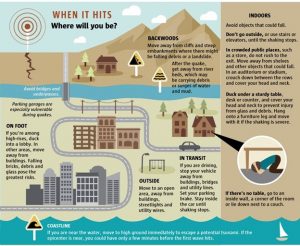
OK, this has nothing to do with delighting Windows customers and partners, but for those who didn’t see this Sunday’s article in the Seattle Times on preparing for a disaster, I’ve shared it here. [Ed: I updated the link to a current article as the original is 404.)

No matter where you are, there’s always a chance that nature will throw something your way. Coming from Northern California a couple of years ago, we’ve had emergency kits in the garage and in each of our cars in anticipation of an earthquake… but this reminded us that we still had a few things left to take care of in case of emergency. At our home we’ve implemented the preparedness that’s popular in Japan, of having suitacases for each member of the house (actually, duffles and packs for the kids), and plastic containers in each car filled with the basics: bottled water, first aid kits, pre-packaged (non-perishable) foods, space blankets, fire extinguisher, flashlight with batteries, rope, tarp and misc personal hygiene items. Water is the most important item: figure on a gallon a day per person, twice that in the summer.

Included in the article was a link to their printable disaster tip sheet which you can use “to get your personal disaster plan into shape.”

Infographic guide to earthquake preparedness

The USGS also maintains a page on earthquake preparedness, in addition to their info on activity by state accessible from their home page (here’s a link for WA).

Highly recommended.

Tags: , , .