Categories
Uncategorized

What do candy, Microsoft products and Congress have in common?

And the answer? Daylight Saving Time. Let’s just say it’s been a popular discussion topic around the office this week.


A 2001 public service announcement for the upcoming turning back of the clocksFor the history of how this came to be — and to know who you can thank for the extra hour of sleep once a year — look to none other than our multi-talented founding father, Benjamin Franklin. You can read more about DST on NPR’s site. Note that it is not “Daylight Savings Time” (with an extra “s”) as it’s often referred: according to the Wikipedia, this is a “common variant… frequently heard in speech and appears in some dictionaries.”


Now, back to our story. As reported in the news, there’s a change coming in the calendar as we will all be asked to move to Daylight Saving Time a full three weeks earlier than in previous years. This year, we’ll move our clocks on March 11 rather than on the first Sunday in April. To be precise: “daylight saving time (DST) start and end dates for the United States will transition to comply with the Energy Policy Act of 2005. DST dates in the United States will start three weeks earlier (2:00 A.M. on the second Sunday in March) and will end one week later (2:00 A.M. on the first Sunday in November).”


You can also thank the US Congress for enacting the Energy Policy Act of 2005, much to the joy of one industry in particular: candy manufacturers, who reportedly lobbied for an extension to DST. This sunny extension will allow trick-or-treaters to scream “trick-or-treat” and collect candy for an additional hour. (Or, as we said in Canada, when I bantered about in the Northern dark, ringing doorbells and crying out “Halloween Apples!”) See also this article in the Provodence Journal for more perspectives on DST.


So what does this have to do with Windows?


Glad you asked.


A change to DST means a change to many Microsoft products, including Microsoft Windows XP, Windows Server 2003: for these there is “a single global time zone update which will include changes for the United States DST change,” including changes that have been released as hotfixes and noted in various KB articles.


For end-users customers, updates for Windows XP SP2 and Windows Server 2003 will be available via Windows Update, Automatic Update, and WSUS starting on December 12, 2006.


For our customers and partners, we have a section on our website dedicated to helping you prepare for daylight saving time changes in 2007. Watch the site over the next couple of weeks as it is being updated regularly with information.


“Microsoft will be producing an update for Microsoft products affected by the new United States daylight saving time transition dates. These updates will be released through a combination of channels including Microsoft Customer Support Services (CSS), hotfixes incorporated in Knowledge Base articles, Windows Update, Microsoft Update, Windows Server Update Services (WSUS), and the Microsoft Download Center.”


For Windows Vista, Office 2007 and Exchange 2007, I believe no updates will be needed, as updated time zone definitions are already included in the products.


Here’s the real fun: Congress may decide to move back to the old schedule. They retained the right to fall back (pardon the pun) to the old 1986 law if after the study period they find that this new change is “unpopular or if energy savings are not significant,” according to the Washington Post. If I were a betting man, I might just take that bet.


More information: We’ll be updating the content on the DST 2007 information page, providing links to key documents and articles that provide more information on DST adjustments for other Microsoft products, including…


Tags: , , , , , .


Also available via http://bit.ly/1SqZ2e

Categories
Uncategorized

WinPE 2.0 in Business Desktop Deployment 2007 Beta

There are a number of things have changed in Windows Vista from XP, many that make corporate and enterprise deployment much easier. The Solution Accelerator for Business Desktop Deployment (aka BDD and BDD 2007 Beta 1) provides deployment guidance on Windows Vista and the 2007 Office system. As it says on the site, “with any advancement in technologies, getting the maximum benefit requires understanding the tools and technologies, some experimentation and absorption time along with best practices on deployment.”


Of particular interest to me is Microsoft Windows Preinstallation Environment (Windows PE) 2.0 – the new version of WinPE for Vista. From the page, Windows PE 2.0 is “designed to make large-scale, customized deployments of the new Windows Vista operating system notably easier. When Windows Vista launches, Windows PE 2.0 will be available to all Windows Vista corporate customers”. 


So, how do you get the BDD 2007 Beta?


A pre-release version of BDD 2007 is currently available. Here’s the info from the the BDD site…


“Go to Connect.microsoft.com to get the BDD 2007 Beta 1 release. Just go to “My Participation” and sign in with your Passport ID. Once you are signed in, click on the link to available connections. Scroll down the page until you see the Business Desktop Deployment 2007 Beta link and click “Apply”.


“This download will include all the deployment tools you’ll need. To provide guidance and simplify deployments, BDD uses an integrated deployment workbench, built on top of innovative deployment tools such as ImageX, System Image Manager, Windows PE 2.0 and Windows Deployment Services. Find out more about these deployment technologies.”

Categories
Uncategorized

New Windows Vista and Office 2007 launch site now online

It’s amazing that a couple of inches of snow can throw the area into a real freeze… but as I mentioned it was great to see that our products helped to keep people connected, productive and on track while most of the office was out of the office this week.


New as of yesterday: the new Microsoft Windows Vista/ Ofice 2007 product launch site is now online, and includes info on Exchange Server 2007.


You can view webcasts and read more about the new products (and the people deploying them), try out the new UIs and sign up for a local launch events.

Categories
Uncategorized

Article: Microsoft, Dell Team on Special Vista PC

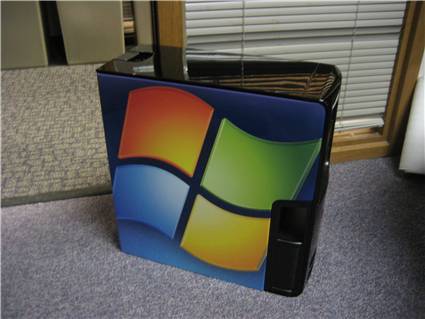
Of interest from BetaNews… very cool and not far off of the config I thought about for a wicked new Windows Vista PC…


Vista logo PC from DellMicrosoft recently partnered with Dell to create a special edition PC to commemorate the launch of Windows Vista. Only a few of the computers have been produced, and there are no plans to sell it, the company says. Among the specifications are a Intel Core 2 Duo Processor, a 512MB NVIDIA GeForce 7900 GTX graphics card, 4GB of SDRAM, 1TB of hard drive space, a DVD+/-RW DL disc drive, dual television tuners, a 30″ widescreen monitor, and surround sound capabilities.


The PC has a rating of 5.2 on Vista’s Windows Experience Index. One of the PCs was raffled off at Microsoft’s internal launch party, with another going to charity. The number of PCs produced, or the plans for the other machines was not announced.

Categories
Uncategorized

TechNet: 10 Things You Need to Know about Deploying Windows Vista

Another top ten list, this time from Technet on 10 Things You Need to Know about Deploying Windows Vista.


    1. Windows Vista Images Are Bigger: With Windows Vista, image size begins at about 2GB—compressed and often around 5GB or more when deployed.

    2. Security Is Enhanced. My most anticipated has been BitLocker for encrypting the hard disk in Windows Vista Enterprise and Ultimate. With so many laptops going issing each year—by one estimate, more than 600,000 computers are stolen each year—BitLocker is one of the features I’ve heard mentioned most when it comes to securing mobile deployments.

    3. Windows Vista Is Componentized

    4. Text-Mode Installation Is Gone

    5. Boot.ini Is History

    6. Settings Are Configured in XML

    7. No More HAL Complications. In Windows Vista, the operating system is able to detect which HAL is required and automatically install it.

    8. Windows PE Rules. Near and dear to my heart, the new version of WinPE for Vista is a welcome revision to the utility that administrators use to manage enterprise customized OS deployments and recovery volumes. (Now available for download here as part of Business Desktop Deployment.) 

    9. It’s All about Images

    10. Deployment Is Language-Neutral. Windows Vista is language-neutral, and language packs can be added to create a deployment image. Servicing is language-neutral, too.

Related Articles From TechNet Magazine:


From the November 2006 issue of TechNet Magazine.