Categories
Uncategorized

Now available: SP2 for Windows Vista and Windows Server 2008 on WU and the Microsoft Download Center

As I noted the other day in my post Thinking about downloading SP2 for Windows Vista or Windows Server 2008? Please download it from a trusted source, I’d seen several third party sites offering downloads to Service Pack 2 (SP2) for Windows Server 2008 and Windows Vista. As I wrote here, you should only download software from a trusted source – via Microsoft – and avoid peer to peer to save yourself the security risk.

As the MU team posted here, Windows Vista and Windows Server 2008 Service Pack 2 will be available in the coming weeks on the Download Center (DLC) and also through Windows Update and WSUS.

That would be today, according to Brandon’s latest post on The Windows team blog…

On April 28th, we announced that Windows Vista and Windows Server 2008 (Service Pack 2) SP2 had RTM’d. Today, we are pleased to announce the Release to Web (RTW) for Windows Vista and Windows Server 2008 SP2.

WV-SP2_h_rgb

Windows Vista and Windows Server 2008 SP2, a combined service pack for both operating systems encapsulated in a single installer, will simplify deployment, management, and support for IT Professionals. It includes support for new types of hardware and emerging hardware standards, as well as updates since SP1.  For specific information on what’s included in SP2, visit the notable changes document.

Windows Vista and Windows Server 2008 SP2 is now available for download on the Microsoft Download Center and on Windows Update.  

Download: Windows Vista and Windows Server 2008 SP2 x86 (5 Language Standalone)
Download: Windows Vista and Windows Server 2008 SP2 x64 (5 Language Standalone)

I agree with Brandon: As I’ve said before, visit Windows Update, or make sure Automatic Update (AU) is turned to get the latest service pack on once it goes live to AU. You can visit the Microsoft Download Center to get SP2 or use Windows Update (WU) to install SP2, but the easiest way is to turn on Automatic Update (AU) and your computer will automatically download and install SP2 beginning via a "throttled release" schedule in June. There’s certainly no harm in using WU today, and this is easy for individual users. IT Pros should download the bits from the DLC and install accordingly.

Tags: Windows Vista, Vista SP1, Gregg Keizer.

Clubhouse Tags: Clubhouse, how-to, Windows Vista, download, SP2, service+pack 

Delicious Bookmark this on Delicious Bookmark and Share

Also available via http://bit.ly/7na8b
Categories
Uncategorized

Thinking about downloading SP2 for Windows Vista or Windows Server 2008? Please download it from a trusted source!

I’ve seen a couple of blog posts offering downloads to Service Pack 2 (SP2) for Windows Server 2008 and Windows Vista, an upcoming update to the OS.

Here’s the advice for the day: as I wrote here, only download software from a trusted source – via Microsoft –and avoid peer to peer to save yourself the security risk.

As the MU team posted here, Windows Vista and Windows Server 2008 Service Pack 2 will be available in the coming weeks on the Download Center (DLC) and also through Windows Update and WSUS…

SP2 includes all updates that were released since SP1. It also includes support for new types of hardware and other technology improvements. For more information on the changes with SP2, see the notable changes document on TechNet.

Here’s a short list of the tools and guidance that’s available for SP2:

MSDN and Technet subscribers may download SP2 now for evaluation and deployment. You may also visit http://technet.microsoft.com/en-us/windows/dd262148.aspx for more details.

And please remember: back up your files.


Tags: articles, blogs, Windows Vista.

Clubhouse Tags: Clubhouse, how-to, Windows Vista, download, backup

Delicious Bookmark this on Delicious Bookmark and Share

Also available via http://bit.ly/16KoVv

Categories
Uncategorized

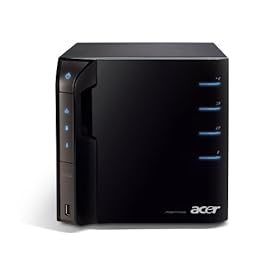
Get ready: New Acer Aspire Windows Home Server appears on Amazon in the States

Acer Aspire AH340-UA230N Home ServerOK, geek moment before the start of the long weekend here in the States. I’m very excited as the new Acer Aspire AH340-UA230N Windows Home Server is outfitted with 2GB of memory and a 1 TB Hard Drive, leaving 3 open slots for additional hard drives to be easily added. 


Full specs (thanks, Mark):


Acer Aspire easyStore AH340-UA230N Home Server:  Available now for a MSRP of $399.99


  • Intel® Atom™ Processor 230 (1.6GHz)

  • Microsoft® Windows® Home Server

  • 2GB DDR2 Memory

  • 1TB Hard Drive

  • Three Empty Hot Swappable Hard Drive Bays

  • Five USB 2.0 Ports

  • One eSATA Port

  • 10/100/1000 Mbps Ethernet

  • 200 Watt Power Supply

  • RJ-45 LAN Port

More on Amazon at http://bit.ly/xp3NJ


Oh, and did I mention that it’s basically a cube? I like the design.


Tags: announcements, Home Server.


Clubhouse Tags: clubhouse, Windows, Home Server


Delicious Bookmark this on Delicious Bookmark and Share


Also available at http://bit.ly/10eja5


Categories
Uncategorized

Advisory: Important Information on SharePoint Server 2007 Service Pack 2

As I posted on Twitter, the SharePoint team has posted important information about SharePoint Server 2007 Service Pack 2 for customers on their team blog:

Attention: Important Information on Service Pack 2

We take product quality seriously and make every effort to avoid and resolve issues that adversely impact our customers.  Unfortunately, we have recently discovered a bug with Service Pack 2 (SP2) that affects all customers that have deployed it for SharePoint Server 2007. 

During the installation of SP2, a product expiration date is improperly activated. This means SharePoint will expire as though it was a trial installation 180 days after SP2 is deployed. The activation of the expiration date will not affect the normal function of SharePoint up until the expiration date passes. Furthermore, product expiration 180 days after SP2 installation will not affect customer’s data, configuration or application code but will render SharePoint inaccessible for end-users.

We are working to release a hotfix to automatically fix this issue. A manual work-around is currently available and involves customers re-entering their Product ID number (PID) on the Convert License Type page in Central Administration.  For more information and detailed steps please read this KB article. (The KB link is not currently active, it will be available within the next 48hrs)

We want to assure our customers that this issue does not impact data integrity or their SharePoint deployment in any other way.

For your convenience, below are some answers to questions that you may have and we will update this blog post with a link to the hotfix as soon as it’s available.

We apologize for any inconvenience this issue may cause you.

Jeff Teper
Corporate Vice President
SharePoint.

More details and Q&A are available via the post, and (as posted) Microsoft KB article 971620.

Tags: announcements, SharePoint.

Clubhouse Tags: clubhouse, Office, SharePoint

Delicious Bookmark this on Delicious Bookmark and Share

Available at http://bit.ly/TPImY

Categories
Uncategorized

Videos: Steve Ballmer and Bill Gates speak at the Microsoft CEO Summit 2009

A quick post: Of interest is the coverage and videos this week from the Microsoft CEO Summit 2009 this week at the Microsoft Conference Center in Redmond, where our groups hosted more than 100 CEOs.

This clip features Steve Ballmer as he "discusses the state of innovation in technology and future industry growth as IT departments continue to embrace the Internet."


A favourite clip is this of Bill Gates as he outlines how we might emerge from the current economic recession.


Tags: articles, what I read, Microsoft, Windows, Steve Ballmer, video

Clubhouse Tags: clubhouse, video, economy

Delicious Bookmark this on Delicious Bookmark and Share
